All club gliders are fitted with the LxNav FLARM displays.
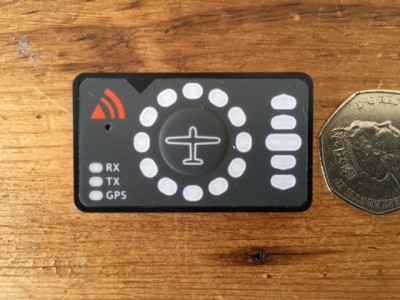
- LxNav display.jpg (36.53 KiB) Viewed 538 times
There is a button in the centre of the display shown by the aircraft symbol. A short press on the button will cycle between three levels of the audio tone that sounds with a WARNING. A WARNING is shown by a red LED in the circle showing direction relative to your track of another FLARM equipped aircraft that is a potential collision risk on present courses. The red LED flashes faster and the audio tone beeps faster as the time to conflict decreases.
WARNING mode is always active.
NEAR mode shows a yellow LED when another FLARM equipped aircraft is detected. A NEAR detection is not a collision risk, it is just information.
NEAR mode can be selected or deselected by a longer press on the button. NEAR mode enabled is shown by a circling yellow LED when the button is pressed, and disabled is shown by a circling red LED. Note this is the opposite of what the manual says!
Here is the official manual, it is not very well written. Note that Obstacle warning is not used.
See also Andy Bardgett's introduction earlier in this forum section.
Barry
All club gliders are fitted with the LxNav FLARM displays.
[attachment=0]LxNav display.jpg[/attachment]
There is a button in the centre of the display shown by the aircraft symbol. A short press on the button will cycle between three levels of the audio tone that sounds with a WARNING. A WARNING is shown by a red LED in the circle showing direction relative to your track of another FLARM equipped aircraft that is a potential collision risk on present courses. The red LED flashes faster and the audio tone beeps faster as the time to conflict decreases.
WARNING mode is always active.
NEAR mode shows a yellow LED when another FLARM equipped aircraft is detected. A NEAR detection is not a collision risk, it is just information.
NEAR mode can be selected or deselected by a longer press on the button. NEAR mode enabled is shown by a circling yellow LED when the button is pressed, and disabled is shown by a circling red LED. Note this is the opposite of what the manual says!
Here is the official manual, it is not very well written. Note that Obstacle warning is not used.
[attachment=1]FlarmLedManualEnglishVer0113-1.pdf[/attachment]
See also Andy Bardgett's introduction earlier in this forum section.
Barry